After Minecraft was updated with Vibrant Visuals, the game's developer Mojang is making the blocky world faster with the Vulkan render engine. For years, the game relied on OpenGL, but Minecraft has finally embraced Vulkan as its new graphics render engine. Are you curious about how to enable Vulkan graphics in Minecraft? Keep reading.
After announcing the plan to transition from OpenGL to Vulkan for the first time in February 2026, Minecraft introduced the Vulkan graphics option in Snapshot 26.2 (also known as the first snapshot for the Minecraft Cubed Chaos update) for Java Edition. The Vulkan API promises better GPU utilization and more stability over time.
In this guide, learn the step-by-step process to enable Vulkan in Minecraft. We also downloaded the latest snapshot to test the performance difference between Minecraft OpenGL and Vulkan. This will provide a better perspective on which graphics engine you should use.
What is Vulkan in Minecraft?
Vulkan is a modern graphics API that gives developers more control over the GPU compared to OpenGL. This helps the game run smoother and more efficiently on systems with powerful dedicated graphics cards. This is the main reason for Minecraft's transition to Vulkan.
Currently, the implementation of Vulkan in Minecraft is experimental and may not be “performant or stable” according to Mojang's blog post. The game reverts to OpenGL on older hardware and drivers. To test the Vulkan graphics feature, you just need to download Minecraft Snapshot 26.2 or newer.
How to Enable Vulkan in Minecraft?
Enabling Vulkan in Minecraft is simple; however, make sure you are using the latest Minecraft snapshot version to play the game. Now, follow the steps below to enable Vulkan in Minecraft:
- Open the Minecraft Launcher, select the latest snapshot version (to the left of the Play button), and click the Play button. You may need to download it first to access.
- Once you are in the game, click the Options button and go to Video Settings.
- Here, click on the ‘Graphics API’ option to switch between OpenGL and Vulkan.
- You can change the setting from Default to ‘Prefer Vulkan’.
- Click Done to save the settings and exit the options menu.
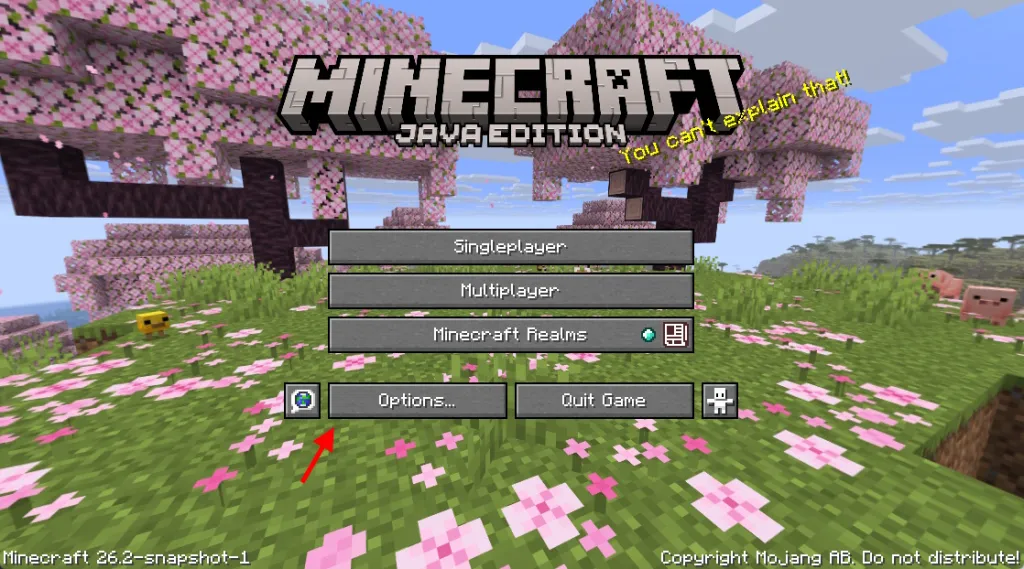
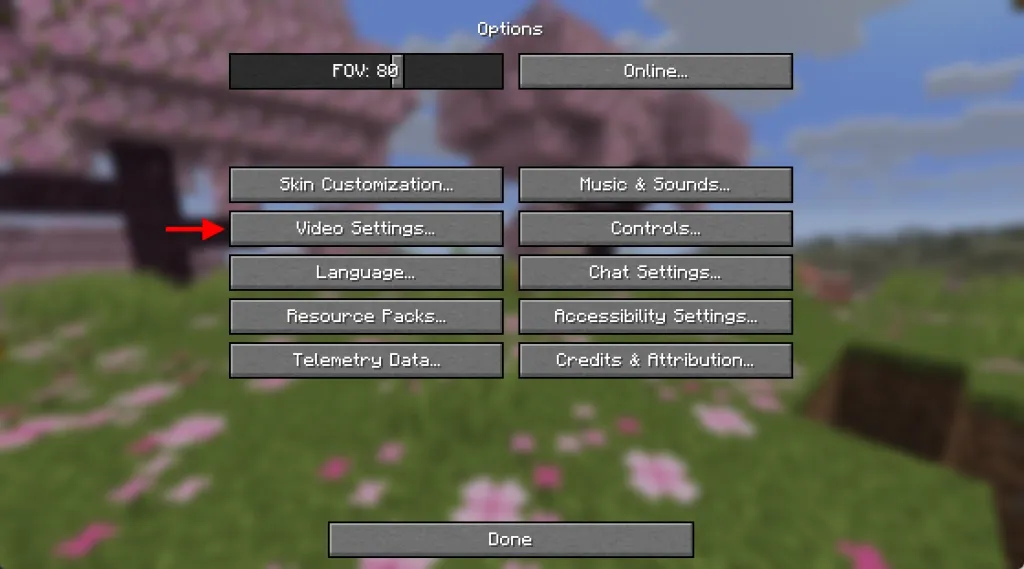
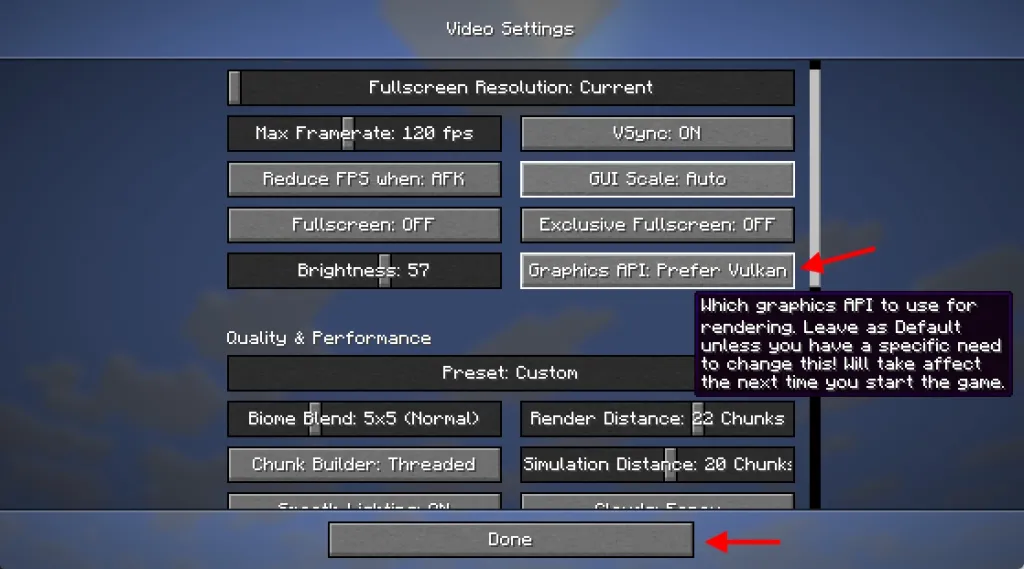
Now, restart the game to ensure the changes are applied correctly. An important point here is that when using the Vulkan API, Minecraft prefers the dedicated GPU over integrated graphics.
After enabling Vulkan, you may notice improvements by entering your Minecraft world. Also, if you love loading cool Minecraft mods, you no longer need a Vulkan Minecraft mod for better performance.
Minecraft OpenGL and Vulkan Performance: Is There Any Improvement?
After enabling Vulkan, you can enter a world and press the F3 key to open the Minecraft debug screen and check on the right side in the system_specs section if Vulkan is displayed instead of OpenGL. Since Vulkan support is still experimental (it will remain in testing until stable), performance numbers may vary among players.
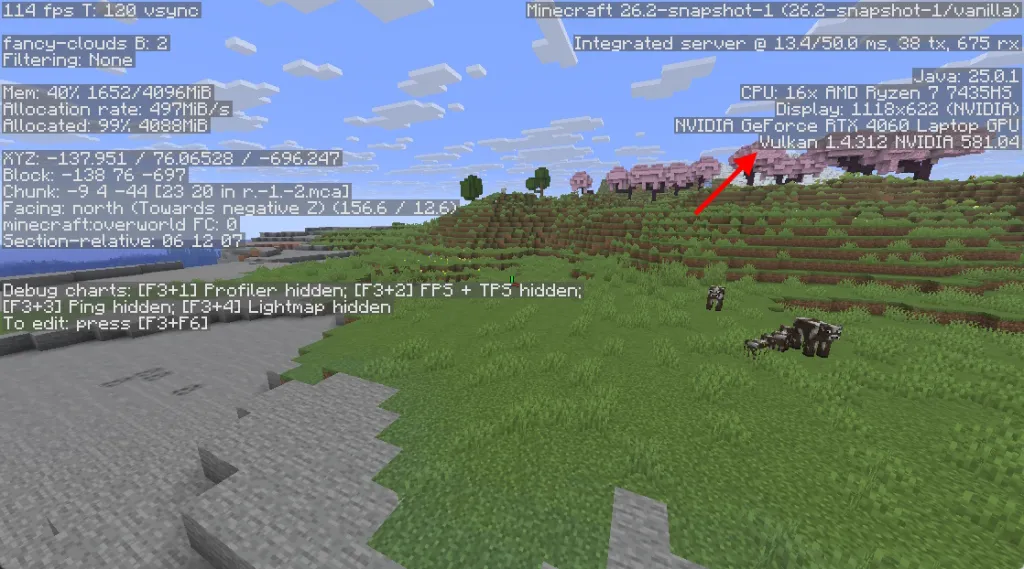
To see more clearly how Vulkan performed compared to OpenGL, I tested both graphics APIs on my mid-range gaming laptop. Here are the system specifications for your reference:
- CPU: AMD Ryzen 7435HS (eight cores, up to 4.5 GHz)
- GPU: NVIDIA GeForce RTX 4060 (8GB GDDR6 VRAM)
- RAM: 24 GB DDR5 RAM
- Storage: 512GB SSD
- Operating System: Windows 11
This setup is powerful enough to run Minecraft at high frame rates. Here is the average FPS comparison between different Minecraft dimensions:
| Dimension | OpenGL | Vulkan |
|---|---|---|
| Overworld | 280 FPS | 490 FPS |
| The Nether | 270 FPS | 530 FPS |
| End Dimension | 230 FPS | 280 FPS |
While testing FPS numbers, I used Windowed Fullscreen mode at 1440p resolution, set graphics settings to ‘Fancy’ preset, set FPS to ‘Unlimited’, and Vsync was OFF. Additionally, the game was set to use the dedicated GPU in the ‘Advanced Graphics’ settings.
In my tests, Vulkan provides a smoother gaming experience; as higher peak FPS values are achieved compared to OpenGL. When encountering dense clusters of trees or numerous Nether structures, OpenGL performance drops to an average of 250-280 FPS. Vulkan, on the other hand, maintains an average FPS around 500, providing a more stable experience.
According to the information provided by Mojang, Vulkan performance varies across generations on Macs. Users with new chips (Apple M3 and above) report that Vulkan is close to OpenGL in terms of FPS. However, older Macs still rely on OpenGL despite being deprecated on macOS. It has been revealed that Mojang uses MoltenVK to convert Vulkan to Metal for Macs.
This is everything you need to know about transitioning to Vulkan in Minecraft and how it affects your in-game performance. So, have you downloaded the Minecraft 26.2 snapshots and tested this new graphics setting? Let us know in the comments below.
Is Vulkan better than OpenGL?In terms of performance and stability, Vulkan offers a smoother gaming experience and higher FPS than OpenGL in Minecraft.
Can you use Vulkan in Minecraft?Yes, you can enable Vulkan from the video settings in the latest Minecraft 26.2 snapshots and join a new world with this graphics API.


























Comments
(2 Comments)